How to use
festivalpilot.
From a blank screen to a finished festival plan — and through everything versions 2.0 to 2.4.1 brought along: Festival Hub, Festival Pass, "For you" recommendations, live mode and Season Recap.
Get going
Open, pick your festival — and land in the Festival Hub, the home base for everything else.
Open, tap a festival, go
On first launch festivalpilot shows you the current season as a festival picker. Tap the one you are going to. You can switch festivals any time — your bookmarks stay separate per festival.
Going to several? Switching works mid-season too. Pro users can keep multiple festivals open in parallel.
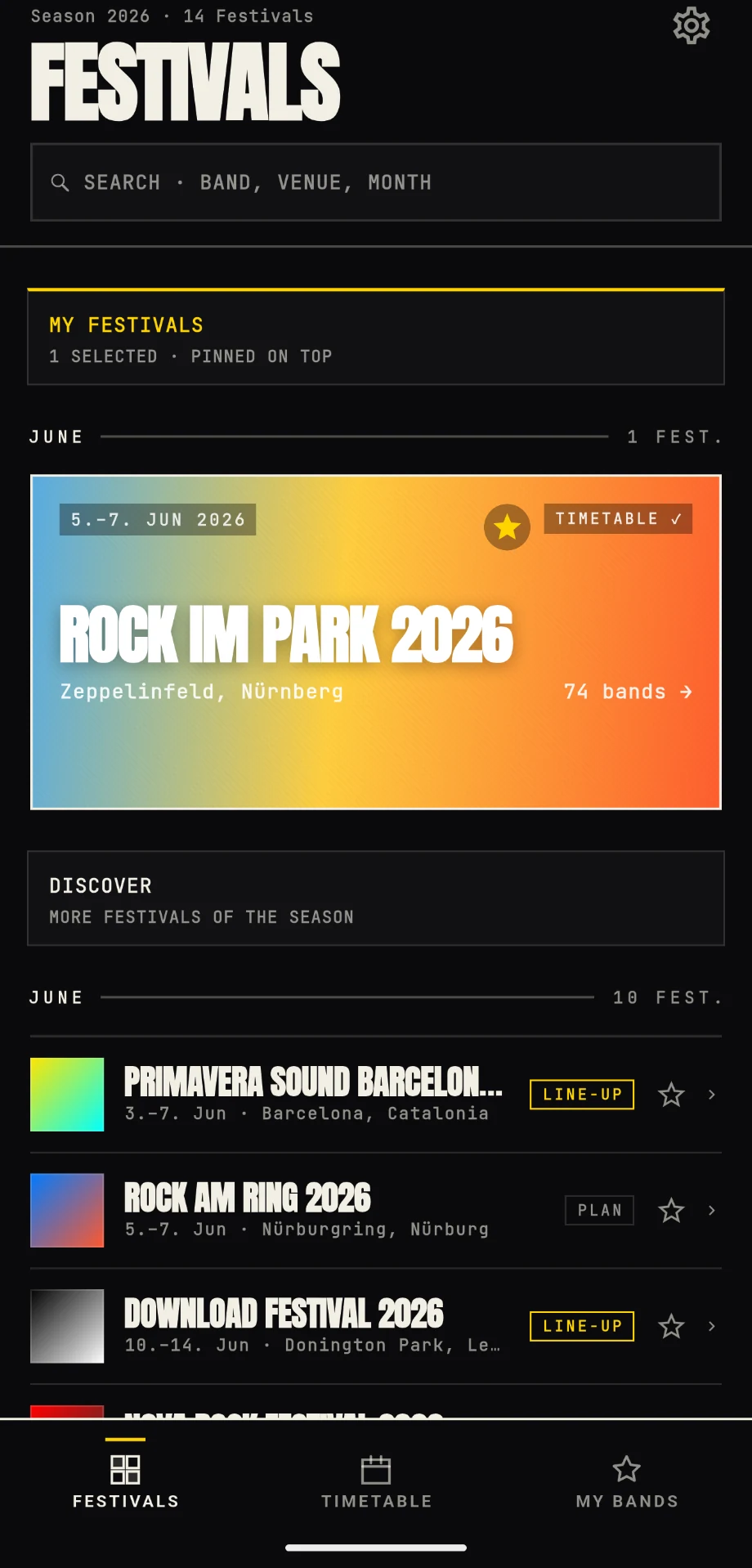
Your home base per festival
Since 2.0 you no longer drop straight into the timetable — you land in the Festival Hub, the home port for every festival. Weather, packing list, open conflicts, timetable, arrival and budget in one place. The Hub is phase-aware: weeks ahead it shows lineup and packing, on festival day it flips to live mode, and afterwards your recap is waiting.
New in 2.4: use “Set as my festival” to make the current festival your default. Once it is over, the Hub automatically suggests your next festival.
Festival
Hub
Build a plan
The core: read the timetable, bookmark bands, resolve conflicts and filter your plan.
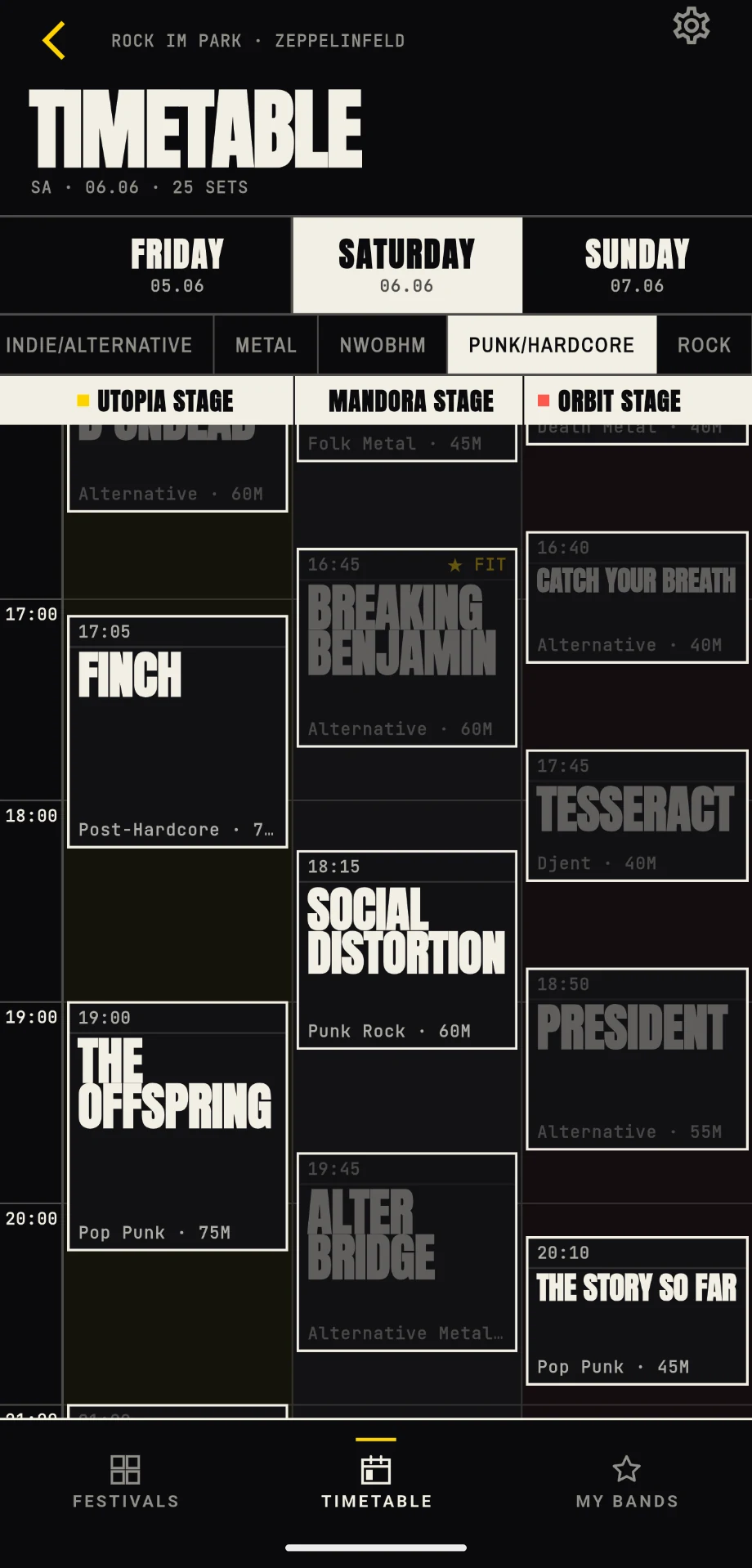
Stages side by side, time runs down
The timetable works like a classic festival poster, just digital. Stages run horizontally, time runs vertically. The red line and LIVE marker show sets on now; “For you” and “Popular” highlight promising discoveries. The app auto-scrolls to the current time.
Bookmarks distinguish must-sees from “interested”. Your essential plan stays yellow without losing sight of possible alternatives.
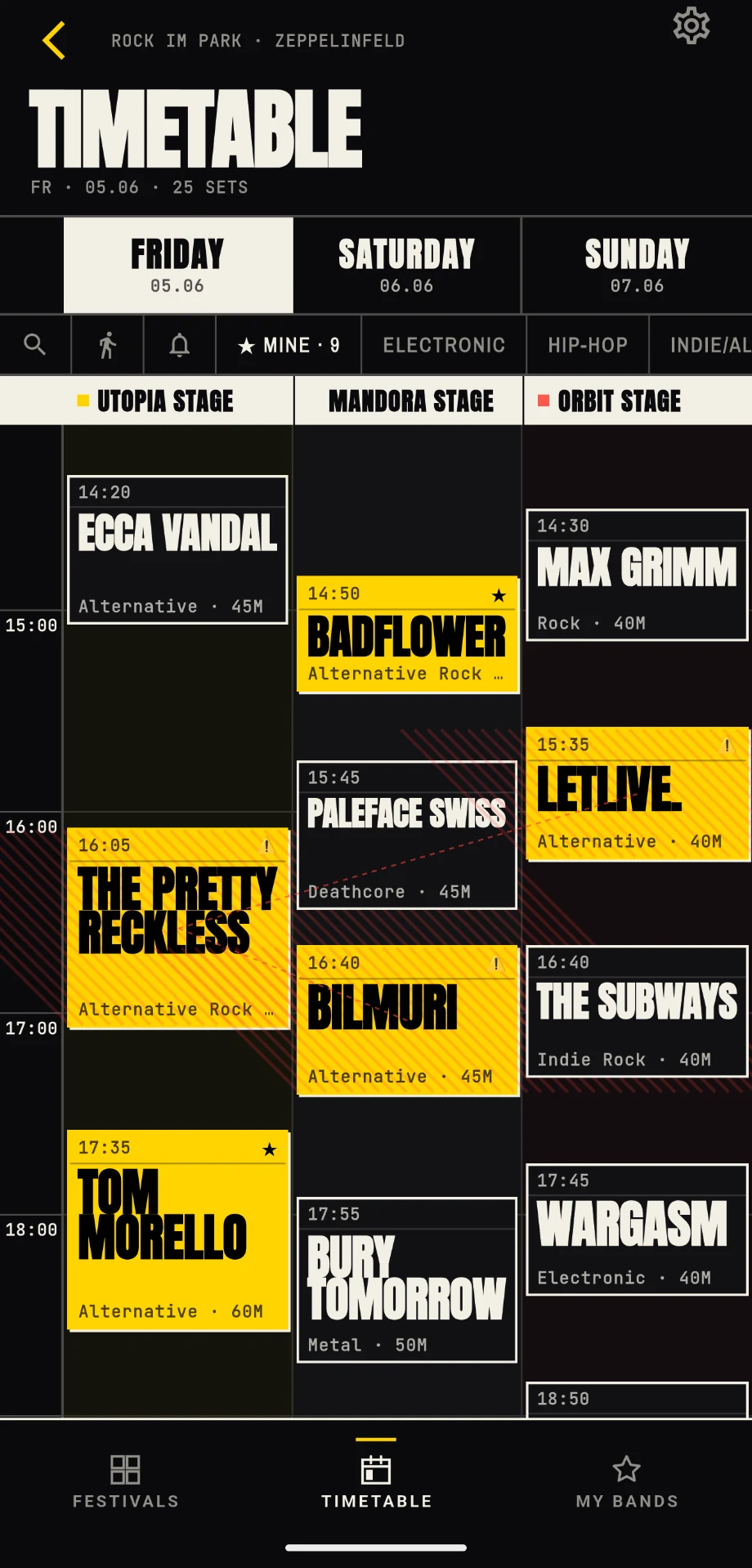
Long-press to bookmark instantly
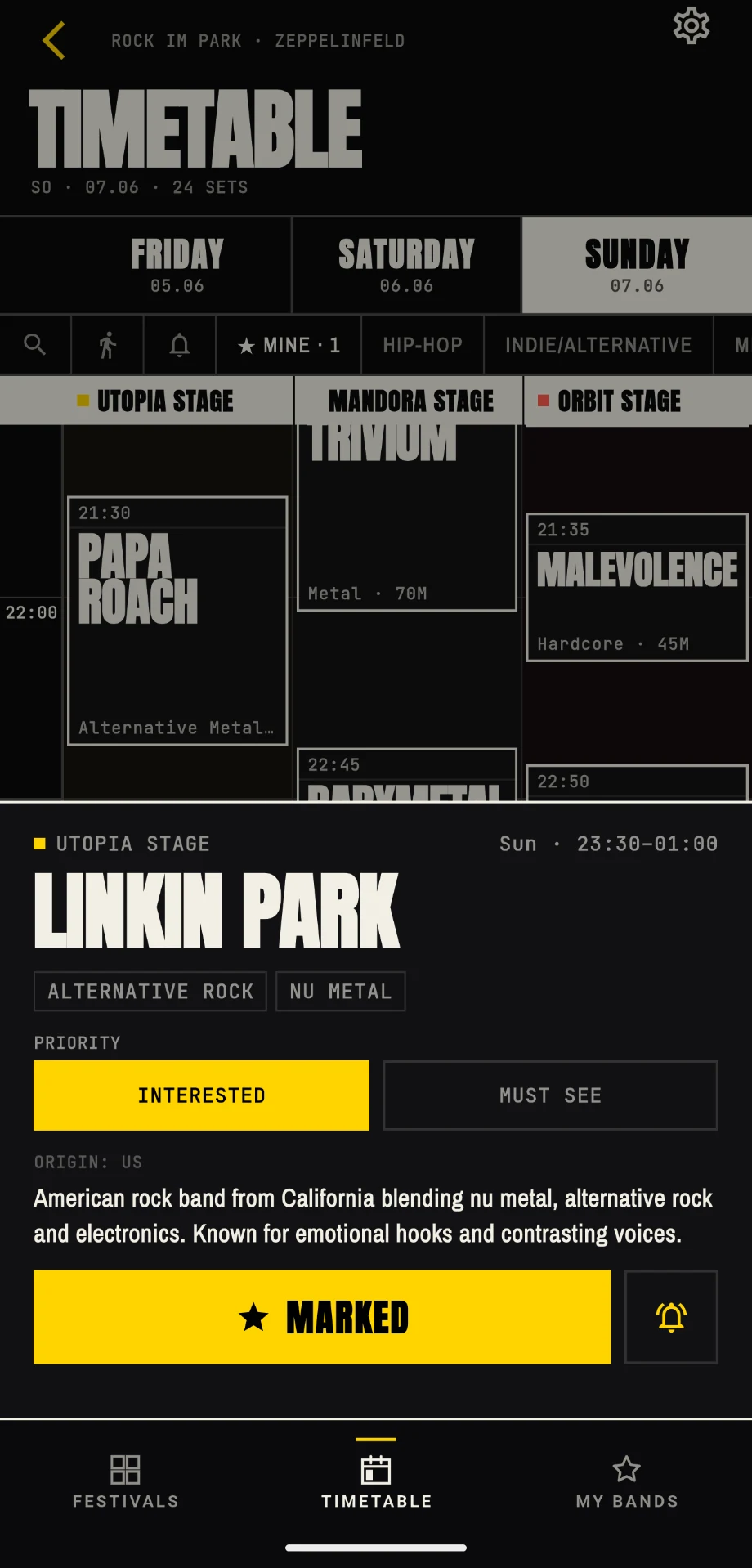
Long-press a slot and it turns yellow immediately — no detour, done. If you want to see band info, stage, duration and genres first, do a quick tap: the slot detail opens with a big bookmark button. Yellow is the only signal for "I want to see this".
Not sure yet? Long-press all candidates first. A second long-press removes the mark again.
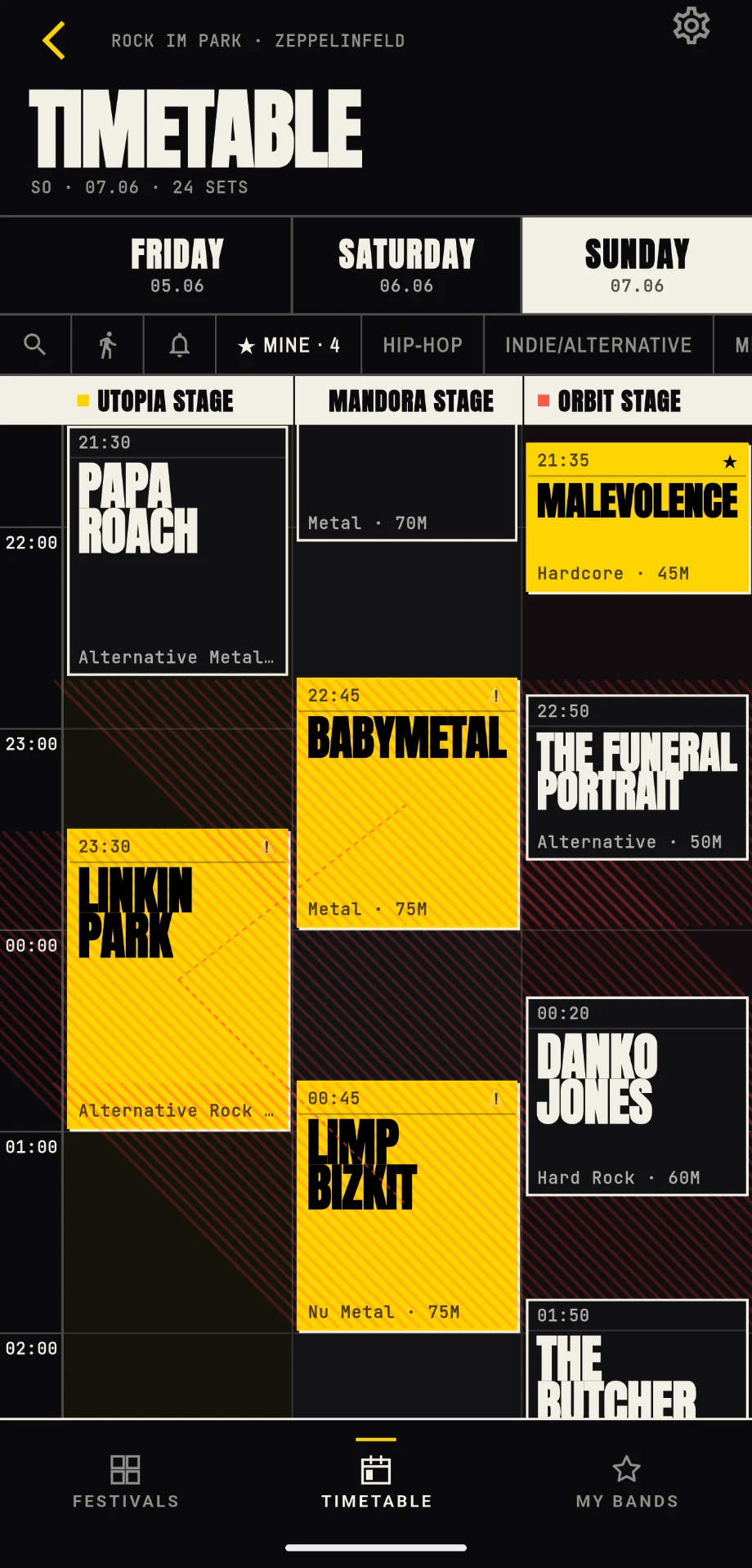
Two favourites, one slot
As soon as you bookmark two bands that overlap in time, festivalpilot shows it instantly. Conflict slots get a hatch pattern and a thin connecting line between them. Clear as a warning sign — no popup nagging.
Tap a conflict slot to see its conflict partner in the detail sheet and jump straight to the other slot.
Genre, day, bookmarks only
Need more overview? Genre filter chips show only what you care about (e.g. "PUNK/HARDCORE"), non-matching slots dim out. Or switch to "MINE" to reduce the lineup to your bookmarks. The day tabs at the top jump between Fri, Sat and Sun.
Filters combine. "MINE" + "Metal" shows all your bookmarked metal bands. Useful for crew alignment.
Your plan at a glance
In the "My bands" tab you see all bookmarked slots — chronological, or grouped by day (Pro feature). The conflict banner at the top surfaces open clashes, every slot shows its status (⚠ unresolved, ✓ resolved). Tap an entry to jump back to the timetable at the right spot.
The "Share" category shows you how to send that plan to your crew.
My
bands
Discover new music
From 2.1 on, festivalpilot is more than a manager: recommendations, band pages and setlists that make your plan better.
Recommendations that actually fit
As soon as you bookmark bands and react to sets, the app builds a picture of your taste — entirely on your device. From it come recommendations with character: 🎯 Safe bet, 💎 Hidden gem and 🧭 Horizon expander. Tap one and the app tells you why it fits.
The adventurousness slider shifts the mix from "stick with what I know" towards "show me something new". Swipe away what does not fit — the app remembers for next time.
For
you
One band, one home base
Tap a band name and the Band Hub opens: where the band plays this season (across all festivals), your history with your own set ratings, links to Spotify, Apple Music and YouTube Music, plus bio and setlist. Follow a band and you keep it in view all season long.
A band playing three of your festivals? The Hub shows every appearance with day, stage and time — and jumps straight into the matching timetable on request.
Bad
Omens
What they will probably play
The setlist predictions pull current tour data from setlist.fm and show the likely setlist per act. Spoiler protection is the default: the prediction sits behind a curtain you deliberately lift.
Prefer to be prepared? Turn the curtain off for good in settings — then you see the setlist right in the band detail.
Likely
setlist
Before the festival
The festival starts before the festival: a packing list with a weather eye, your budget under control and the arrival planned.
Pack with a weather eye
The packing list knows your festival: a 7-day weather forecast right in the Hub. If 70% rain is forecast for Wacken but the rain jacket is not ticked off yet, the list nudges you. Swipe-to-delete, an inline quantity counter per row, clothing scales automatically with festival days.
Custom categories, history and export come with Pro. New essentials are backfilled into existing templates too.
Packing
list
Where the money goes
Festival spending creeps up quietly. The budget tracker makes it visible: quick-tap presets for beer, food and merch, a progress bar against your limit, day tabs in live mode and separate categories for prep and on-site. Swipe to delete, haptic feedback, all local.
Set a limit before the festival. The bar shifts colour when it gets tight — before the weekend surprises your bank account.
Budget
tracker
From sofa to stage
In the Festival Hub you'll find the Arrival Planner: open the festival address directly in Apple Maps, Google Maps or Waze. Plus curated parking, public transport and shuttle tips. Enter your postcode and the app estimates drive time and a 'leave by' time — fully offline from a bundled DACH postcode table.
The 'leave by' time adds an hour of buffer for the drive, parking and the entrance. If you want to be early, plan accordingly.
From sofa
to stage
On site
The weekend is on: live mode with walking times, your steps in view and location markers so you find your way back.
Now, next, how far
When the festival is running, the Hub flips to LIVE MODE. “Now playing” shows every act currently on stage in one grid, followed by your day plan. The festival day starts at the real opening time instead of midnight. Walking times show how long you need between stages.
Weather now sits directly in the PLAN tab. The live step counter runs right under Now/Next (Pro) — the metric that, by Sunday night, explains surprisingly well why your feet are burning.
Now &
next
Find your car and tent again
Drop pins for car, tent, meetup point or stage. Show your crew where your stuff is even on Sunday morning, without signal or with a dead battery. Pins are stored locally — no cloud, no one else's eyes, no tracking.
Pin right after you set up — not when you're stumbling between 20,000 tents at 3 am on Sunday.
My
spots
Tricks & details
Small things that turn a guide into an actual plan.
Festival Pass instead of a subscription
Open a locked Pro feature for your festival and the app offers two routes: Festival Pass unlocks that one festival as a one-time purchase — no renewal, active from one day before it starts until one day after it ends. Season Pass covers every festival and renews yearly.
Mark tickets as done
Already bought your ticket? Mark the ticket tile as done in the Festival Hub. The purchase prompt disappears and the Hub gets back to your next useful preparation step.
Offline mode
Once you have opened a festival, all data is stored locally (Hive storage). On festival day just keep airplane mode on to save battery. Online is only used to pull lineup updates and live hints.
Push reminders before set
Push reminders are sent per bookmarked slot. Default lead time is 15 minutes before set start. Fixed in the free tier; Pro lets you change it or disable per slot.
On your wrist
The Wear OS and Apple Watch companions show countdown, Now/Next and Next Up right on your wrist. The countdown keeps running even when a bookmarked festival has no open bands left in your plan — the days until it starts still tick down.
Next festival, seamless
When a festival is over the Hub does not leave you hanging: it automatically offers your next bookmarked festival and switches live mode and the watch countdown straight over. Pick the countdown target by long-pressing a festival in your list.
Custom header gradient
Pro feature: from the timetable header or the "lineup coming"-empty state you open the gradient editor and pick a 3-colour gradient for your festival. Recognition cue when you run multiple festivals in parallel.
Quick festival switch
Long-press the timetable icon in the bottom navigation to open a list of all actively bookmarked festivals — one tap and you are over there. Handy when you plan two festivals in parallel.
Send hints
In the timetable empty state (when a festival has no schedule yet) and in the slot detail during a running festival you find the "Send hint" button. You correct data for everyone else with the app — no account, no trackers.
Share a pin as a meetup
Drop a marker on your crew's meetup point and export it as a maps link via the share sheet. Anyone not there yet taps straight into their favourite maps app. Works even if the recipient does not have festivalpilot.
Still curious?
Quick answers to common how-to questions.
- Can I un-bookmark?
- Yes — a second long-press removes the bookmark.
- Are the "For you" recommendations private?
- Yes. Your taste profile and all recommendations are built entirely on your device — no account, no upload, no cloud AI.
- Do the setlists spoil too much?
- Only if you want. Predictions sit behind a spoiler curtain you deliberately lift — or turn off for good in settings.
- Can I share my plan?
- Yes. Generate a plan card as a story or square image and send it via any messenger — see the "Share" category.
- Do Arrival Planner and Location Markers work offline?
- Yes. The postcode estimate lives in a bundled local DACH table; the maps apps only open briefly for navigation. Location pins never leave your device — everything stays local.
- What does "Pro locked" mean?
- Some extras (by-day view, walking times, custom gradient, custom reminder lead time, live step counter, packing-list export) require Pro. Festival Pass is a one-time purchase for one festival; Season Pass unlocks Pro for every festival and renews yearly.
More about the product, our stance and privacy on the homepage FAQ section.
All clear?
Get the app.
Native app for iOS and Android. Free on the App Store and Google Play.